Problem Statement
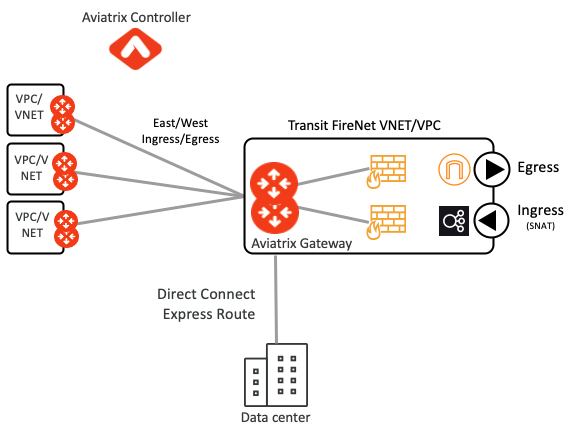
- As enterprises moving their applications into the cloud, they are following the best practice to deploy their virtual NGFW in the Cloud using Aviatrix’s active/active, centralized, uncompromised, cost optimized an dpolicy-based Firewall Service Insertion (FireNet) solution as shown in the following diagram
- Some enterprises want to keep using their on-premise physical NGFW until they deploy virtual NGFW in the cloud.
- If these on-premise firewalls are deployed in an active/active fashion they plug right into Aviatrix active/active transit architecture in the cloud to provide the full benefit and throughput
- However, often times these on-premise firewalls are deployed in active/standby fashion where it is important that sessions are symmetric otherwise firewall could drop the traffic
- Enterprises want to provide active/active ECMP functionality in the Cloud while still making active/standby connection to the on-premise physical firewall to make sure traffic is not asymmetric when it passes through those Firewalls.
Solution
- With Aviatrix release 6.2, Aviatrix transit gateways provide best of the both worlds by providing Active/Active traffic distribution towards the North (Cloud) side, while providing Active/Standby (optionally) towards the South (on-premise) side to satisfy Firewall’s Active/Standby needs.
- This is done at the Aviatrix Transit layer by providing dual routing capabilities at the Aviatrix Transit Gateway. This built-in, single click dual routing makes the Transit GW to act as ECMP router on the North side and Active/Standby on the South.
Enterprise Active/Standby Firewall Design
Design Notes
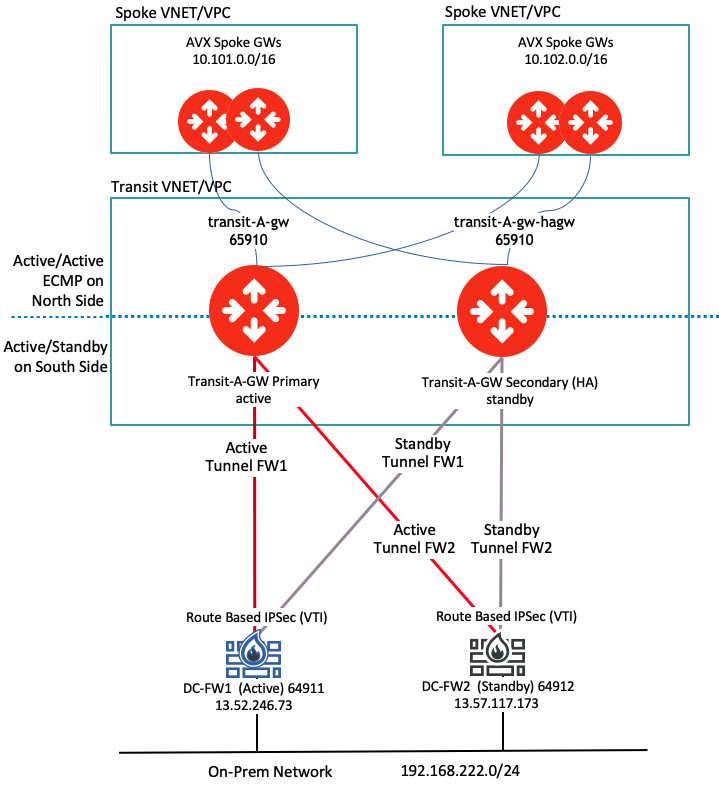
- Active Aviatrix Transit GW builds one tunnels towards the DC-FW1
- Standby Aviatrix Transit GW (HA) will build another tunnel towards the DC-FW1
- The IPSec tunnels build from Aviatrix Transit GW are Route Based IPSec tunnels (VTI)
- At any time, only one Aviatrix Transit GW can be in an Active Mode
- Both tunnels are technically up but only one path is selected based on the MED (Metric) value
- It is the on-premise firewall team’s responsibility to properly configure the firewall to be in the Active/Standby mode
- It is on-premise firewall team’s responsibility to properly configure the BGP attributes (if needed) so that the route received from the Aviatrix Transit GW active tunnel are preferred over the secondary tunnel
- BGP local attribute such a weight can be used on the firewall to influence the active path selection
Traffic Flow From Cloud to On-Premise Firewall
Traffic Flow#1
- Traffic from Cloud EC2/VM leaves the Spoke VPC and enter into Primary Transit GW
- The primary transit GW is also the active one
- The secondary transit GW is on the standby
- From here there are two paths to reach to On-premise firewall
- Since the MED value from the Primary (active) Transit GW is lower than the one received from the HA pair, it will prefer the Primary Transit GW path and will directly go towards the DC-FW1
Traffic Flow#2
- Another scenario is that the traffic from Cloud EC2/VM leaves the Spoke VPC and enters into Secondary Transit GW (HA)
- The secondary transit GW is on the standby
- The primary transit GW is the active one
- From here again there are two paths to reach to on-premise firewall
- Since the MED value from the primary (active) transit GW is lower than the one received from the secondary transit GW (standby), the traffic will be routed towards the primary transit GW via the HA-Link between Active and HA Transit GW pair
Deployment Details
- Create site to cloud tunnel using the Multi-Cloud Transit workflow
- Do not enable “Remote Gateway HA” option
- It means this feature requires only one IP address on the on-premise firewall
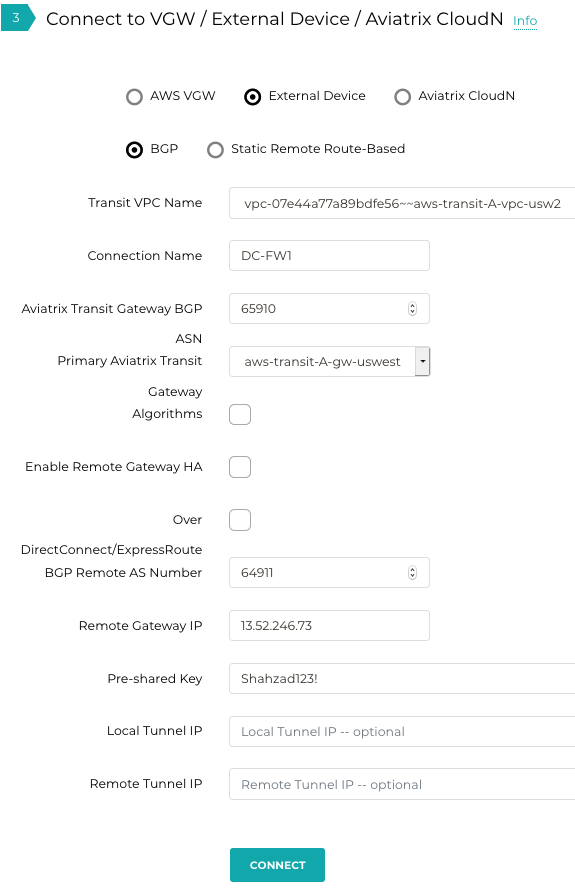
- Build all 4 tunnels from the firewall towards the Aviatrix designated primary and secondary gateways
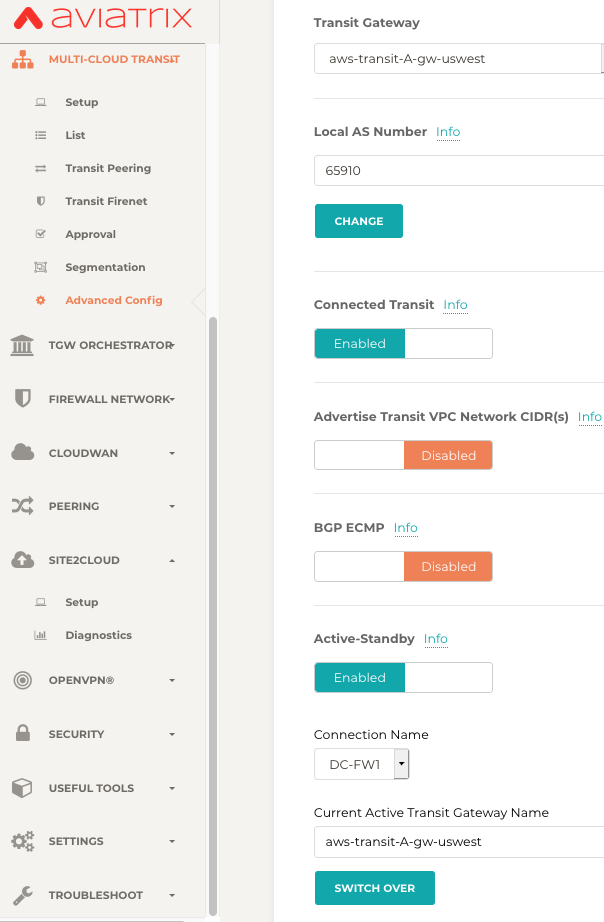
- Once the tunnels are UP we need to enable active-standby feature underMulticloud Transit -> Advanced Config
Testing and validation when both firewalls are up
- Controller also gives visibility into the Active GW
- Controller also allows to switch the Active GW to Standby and vice versa for Troubleshooting and verification purposes
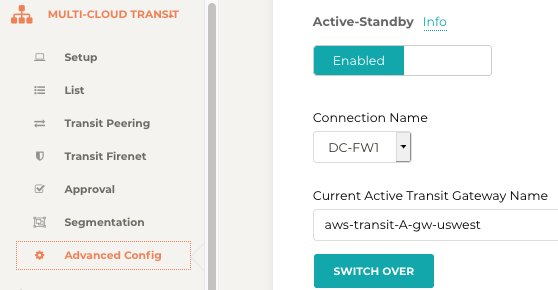
Following picture shows that the Active/Standby feature is enabled and also shows the active aviatrix gateway name
Transit Gateway Routing Tables when “transit-A-GW” is Active
- In the following table “transit-A-gw” is active
- Table shows that the on-premise route 192.168.222.0/24 is learned both from Active and Standby Transit GWs.
- Since 192.168.222.0/24 is learned via DC-FW-1 with lower MED value, it means that route will be preferred over the other
Destination| Via| Dev| Nexthop IP| Nexthop Gateway| Status| Metric
—|—|—|—|—|—|—
192.168.222.0/24| | tun-0D34F649-0| 13.52.246.73| DC-FW1| up| 100
192.168.222.0/24| | tun-0A0A0029-0| 10.10.0.41| aws-transit-A-gw-uswest-hagw| up| 200
transit-A-gw route table when transit-A-gw is active
- Next table shows the route from standby transit GW’s (aws-transit-A-gw-uswest-hagw) perspective
- The standby can reach 192.168.222.0/24 via the active transit GW with the lower MED, hence that route will be preferred
Destination| Via| Dev| Nexthop IP| Nexthop Gateway| Status| Metric
—|—|—|—|—|—|—
192.168.222.0/24| | tun-0A0A002C-0| 10.10.0.44| aws-transit-A-gw-uswest| up| 200
192.168.222.0/24| | tun-0D34F649-0| 13.52.246.73| DC-FW1| up| 300
transit-A-gw-ha route table when transit-A-gw is active
Transit Gateway Routing Tables when “transit-A-gw-ha” is Active
We switched the Active/Standby via the controller
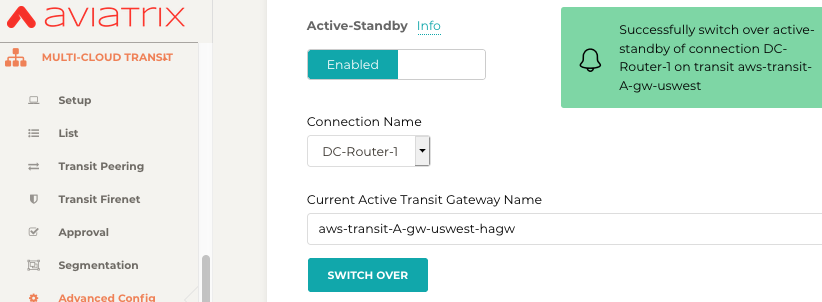
- Now aws-transit-A-gw-uswest-hagw is active.
- We will look at the GW route table again. Now notice that “aws-transit-A-gw-uswest-hagw” is preferred over the other based on the lower MED value
Destination| Via| Dev| Nexthop IP| Nexthop Gateway| Status| Metric
—|—|—|—|—|—|—
192.168.222.0/24| | tun-0A0A0029-0| 10.10.0.41| aws-transit-A-gw-uswest-hagw| up| 200
192.168.222.0/24| | tun-0D34F649-0| 13.52.246.73| DC-FW-1| up| 300
aws-transit-A-gw-uswest route table when aws-transit-A-gw-uswest-hagw is active Destination| Via| Dev| Nexthop IP| Nexthop Gateway| Status| Metric
—|—|—|—|—|—|—
192.168.222.0/24| | tun-0D34F649-0| 13.52.246.73| DC-FW-1| up| 100
192.168.222.0/24| | tun-0A0A002C-0| 10.10.0.44| aws-transit-A-gw-uswest| up| 200
aws-transit-A-gw-uswest-hagw route table when aws-transit-A-gw-uswest-hagw is active
Testing and validation when active firewall is down
- Now we will shut down the Active DC-FW-1
- This will stop sending the 192.168.222.0 route from DC-FW-1
- The standby firewall DC-FW-2 will become active now and start sending 192.168.222.0 to the Aviatrix transit gateways
Destination| Via| Dev| Nexthop IP| Nexthop Gateway| Status| Metric
—|—|—|—|—|—|—
192.168.222.0/24| | tun-0A0A0029-0| 10.10.0.41| aws-transit-A-gw-uswest-hagw| up| 200
192.168.222.0/24| | tun-0D3975AD-0| 13.57.117.173| DC-FW-2| up| 300
aws-transit-A-gw-uswest route table while aws-transit-A-gw-uswest-hagw is active
Destination| via| Dev| Nexthop IP| Nexthop Gateway| Status| Metric
—|—|—|—|—|—|—
192.168.222.0/24| | tun-0D3975AD-0| 13.57.117.173| DC-FW-2| up| 100
192.168.222.0/24| | tun-0A0A002C-0| 10.10.0.44| aws-transit-A-gw-uswest| up| 200
aws-transit-A-gw-uswest-hagw route table while aws-transit-A-gw-uswest-hagw is active
Additional Configuration
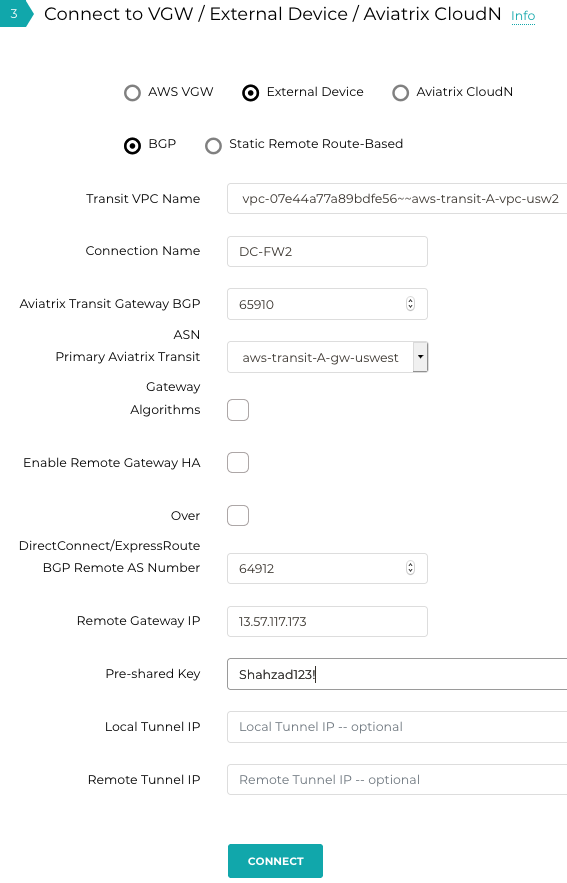
Following diagram shows the second tunnel towards the DC-FW2
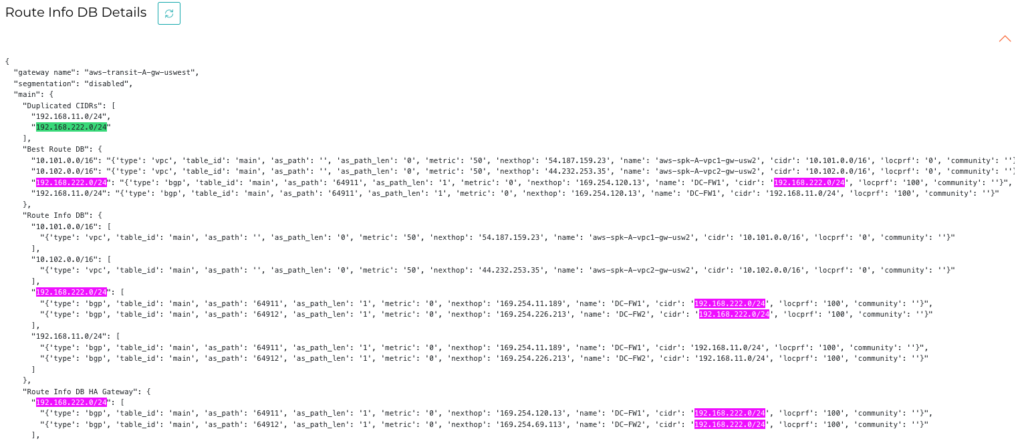
Aviatrix Transit GW Global Routing Table shows the on-prem subnet received at both GWs and best route installed via the Active one only